Arch Linux Wayland Software Does Not Work

Normally I would not complain or give an open source project grief about documentation issues or having to work through installation issues too much, but when an open source project is selling hardware that you have to pay for, and that hardware is useless without the supplied software, it’s pretty frustrating.

The documentation just seems to be a mess of various options to try. There seems to be at least a few dead links I’ve come across and various issues with the many of the instructions. Like, for example, one of the Arch install options involves downloading the *.zst package to install with pacman, but there is no zst package I am able to find.

As the title states, I’m using Arch with Wayland and the Sway Window Manager. I can run the install script which appears to execute fine and installs all ‘required’ dependencies. I have tried some of the other various options, with no success. I have not documented everything, I’ve done/tried at this point, but I have yet to be able to get the software to successfully open.

Currently when I attempt to start OpenterfaceQT, it seems that it is saying it is unable to find a qt Shell integration.

HERE=/tmp/.mount_opentepoCkbm
LD_LIBRARY_PATH=/tmp/.mount_opentepoCkbm/usr/lib:/tmp/.mount_opentepoCkbm/usr/lib/gstreamer-1.0:/tmp/.mount_opentepoCkbm/lib/x86_64-linux-gnu:/usr/lib/x86_64-linux-gnu:/usr/lib:/lib
LD_PRELOAD=
PATH=/tmp/.mount_opentepoCkbm/usr/bin:/tmp/.mount_opentepoCkbm/bin:/usr/local/bin:/usr/bin:/bin
GST_PLUGIN_PATH=/tmp/.mount_opentepoCkbm/usr/lib/gstreamer-1.0
QT_PLUGIN_PATH=/tmp/.mount_opentepoCkbm/usr/lib/plugins:/tmp/.mount_opentepoCkbm/usr/plugins:/usr/lib64
Start openterface...
Dynamic build: Set QT_QPA_PLATFORM to wayland (WAYLAND_DISPLAY available, X11 not found)
Creating QApplication...
qt.qpa.wayland: No shell integration named "xdg-shell" found
qt.qpa.wayland: No shell integration named "wl-shell" found
qt.qpa.wayland: No shell integration named "ivi-shell" found
qt.qpa.wayland: No shell integration named "qt-shell" found
qt.qpa.wayland: Loading shell integration failed.
qt.qpa.wayland: Attempted to load the following shells QList("xdg-shell", "wl-shell", "ivi-shell", "qt-shell")
qt.qpa.plugin: Could not load the Qt platform plugin "wayland" in "/tmp/.mount_opentepoCkbm/usr/lib/plugins/platforms" even though it was found.
This application failed to start because no Qt platform plugin could be initialized. Reinstalling the application may fix this problem.

Available platform plugins are: minimal, offscreen, wayland-egl, wayland, xcb.

Aborted                    (core dumped) openterfaceQT

I’ve reinstalled qt6-base. No change.

I’m not terribly familiar with troubleshooting QT applications, but when I look in the qt6 plugins directory, I see the following:

ls -l /usr/lib/qt6/plugins/wayland-shell-integration/
total 176
-rwxr-xr-x 1 root root  27024 Aug 20 03:47 libfullscreen-shell-v1.so
-rwxr-xr-x 1 root root  14584 Aug 18 07:57 liblayer-shell.so
-rwxr-xr-x 1 root root  18768 Aug 20 03:47 libwl-shell-plugin.so
-rwxr-xr-x 1 root root 113832 Aug 20 03:47 libxdg-shell.so

I didn’t seem to find any other topics that had this same issue. The support form link on the website is a dead link. I guess I’ll try sending a support email, but given how the site and documentation are being maintained, I’m not super hopeful I’ll get a timely response. So I figured I’d try the forum as well.

I think I might try installing xcfe or some other desktop to see if maybe this will run under something other than sway I guess, because I really am not sure what else to try right now.

That’s cool. Installed KDE Plasma, booted into that. The software actually opened. I plugged in the device and it actually showed me the screen from the other computer. But keyboard wouldn’t work. Tried re-running the installer again and it said everything was successful, but now the software fails to open again.

curl -fsSL https://raw.githubusercontent.com/TechxArtisanStudio/Openterface_QT/main/build-script/install-release.sh | bash

==================================================
  Openterface QT Release Installer
==================================================

ℹ️  Detecting system information...
  Architecture: x86_64
  Distribution: arch  (arch)
  Package Manager: pacman

ℹ️  Fetching latest release information...
✅ Using latest release: 0.5.28

ℹ️  Checking for existing installations...
ℹ️  Removing old installation...

ℹ️  Finding release asset for 0.5.28 (x86_64)...

ℹ️  Installing runtime dependencies...
warning: qt6-base-6.11.2-2 is up to date -- reinstalling
warning: qt6-multimedia-6.11.2-1 is up to date -- reinstalling
warning: qt6-serialport-6.11.2-1 is up to date -- reinstalling
warning: libusb-1.0.30-1 is up to date -- reinstalling
warning: systemd-libs-261.2-1 is up to date -- reinstalling
warning: ffmpeg-2:9.0.1-1 is up to date -- reinstalling
resolving dependencies...
looking for conflicting packages...

Packages (6) ffmpeg-2:9.0.1-1  libusb-1.0.30-1  qt6-base-6.11.2-2  qt6-multimedia-6.11.2-1  qt6-serialport-6.11.2-1  systemd-libs-261.2-1

Total Installed Size:  125.74 MiB
Net Upgrade Size:        0.00 MiB

:: Proceed with installation? [Y/n] 
(6/6) checking keys in keyring                                                                   [########################################################] 100%
(6/6) checking package integrity                                                                 [########################################################] 100%
(6/6) loading package files                                                                      [########################################################] 100%
(6/6) checking for file conflicts                                                                [########################################################] 100%
(6/6) checking available disk space                                                              [########################################################] 100%
:: Processing package changes...
(1/6) reinstalling systemd-libs                                                                  [########################################################] 100%
(2/6) reinstalling qt6-base                                                                      [########################################################] 100%
(3/6) reinstalling libusb                                                                        [########################################################] 100%
(4/6) reinstalling ffmpeg                                                                        [########################################################] 100%
(5/6) reinstalling qt6-multimedia                                                                [########################################################] 100%
(6/6) reinstalling qt6-serialport                                                                [########################################################] 100%
:: Running post-transaction hooks...
(1/1) Arming ConditionNeedsUpdate...
✅ Dependencies installed

ℹ️  Downloading release: https://github.com/TechxArtisanStudio/Openterface_QT/releases/download/0.5.28/openterfaceQT_linux_amd64.AppImage
✅ Downloaded: openterfaceQT_linux_amd64.AppImage
ℹ️  Installing package...
ℹ️  Installing AppImage...
✅ AppImage installed: /usr/local/bin/openterfaceQT

ℹ️  Creating launcher wrapper...
✅ Wrapper created: /usr/local/bin/openterfaceQT

ℹ️  Setting up device permissions...
✅ Permissions configured

ℹ️  Creating desktop integration...
✅ Desktop entry created


==================================================
  ✅ Installation Complete!
==================================================

Version: 0.5.28
Architecture: x86_64
Distribution: arch 

🚀 How to run:
  • Terminal: openterfaceQT
  • Desktop: Search for 'OpenterfaceQT' in applications menu
  • Binary: /usr/local/bin/openterfaceQT

📝 Notes:
  • You may need to log out and back in for permission changes
  • If mouse/keyboard don't work: sudo apt remove brltty
  • Desktop menu may require refresh or relogin

🔗 Release: https://github.com/TechxArtisanStudio/Openterface_QT/releases/tag/0.5.28
openterfaceQT 
/usr/local/bin/openterfaceQT: line 10: /usr/local/bin/openterfaceQT-bin: No such file or directory

I’m about ready to throw this thing in the trash and take the $100 loss at this point. I’ve been trying to get this to work for a week now.

I guess the jet kvm most people seemed to recommend when I was looking around for a device like this would have been a better purchase. I thought this style of device sounded more useful to me, not being a network accessible device. But if the ‘fully supported’ Arch/Linux software doesn’t work, the device is completely useless.

Ok, so when I have this error:

openterfaceQT 
/usr/local/bin/openterfaceQT: line 10: /usr/local/bin/openterfaceQT-bin: No such file or directory

I see this post saying to try the latest appimage and I download vs 0.5.19 appimage and replace the version installed by the installed script, and that puts me back to the error where it’s unable to start a qt shell.

HERE=/tmp/.mount_opentebmnHDG
LD_LIBRARY_PATH=/tmp/.mount_opentebmnHDG/usr/lib:/tmp/.mount_opentebmnHDG/usr/lib/gstreamer-1.0:/tmp/.mount_opentebmnHDG/lib/x86_64-linux-gnu:/usr/lib/x86_64-linux-gnu:/usr/lib:/lib
LD_PRELOAD=
PATH=/tmp/.mount_opentebmnHDG/usr/bin:/tmp/.mount_opentebmnHDG/bin:/usr/local/bin:/usr/bin:/bin
GST_PLUGIN_PATH=/tmp/.mount_opentebmnHDG/usr/lib/gstreamer-1.0
QT_PLUGIN_PATH=/tmp/.mount_opentebmnHDG/usr/lib/plugins:/tmp/.mount_opentebmnHDG/usr/plugins:/usr/lib64
Start openterface...
Dynamic build: Set QT_QPA_PLATFORM to wayland (WAYLAND_DISPLAY available, X11 not found)
Creating QApplication...
qt.qpa.wayland: No shell integration named "xdg-shell" found
qt.qpa.wayland: No shell integration named "wl-shell" found
qt.qpa.wayland: No shell integration named "ivi-shell" found
qt.qpa.wayland: No shell integration named "qt-shell" found
qt.qpa.wayland: Loading shell integration failed.
qt.qpa.wayland: Attempted to load the following shells QList("xdg-shell", "wl-shell", "ivi-shell", "qt-shell")
qt.qpa.plugin: Could not load the Qt platform plugin "wayland" in "/tmp/.mount_opentebmnHDG/usr/lib/plugins/platforms" even though it was found.
This application failed to start because no Qt platform plugin could be initialized. Reinstalling the application may fix this problem.

Available platform plugins are: minimal, offscreen, wayland-egl, wayland, xcb.

Aborted                    (core dumped) openterfaceQT

So the newer appimage seems to fix one issue, but the installer still seems to be missing some dependency or something. I’ll keep trying to figure out this qt shell thing I guess. If anyone has any suggestions it would be greatly appreciated.

OK, baby steps I guess.

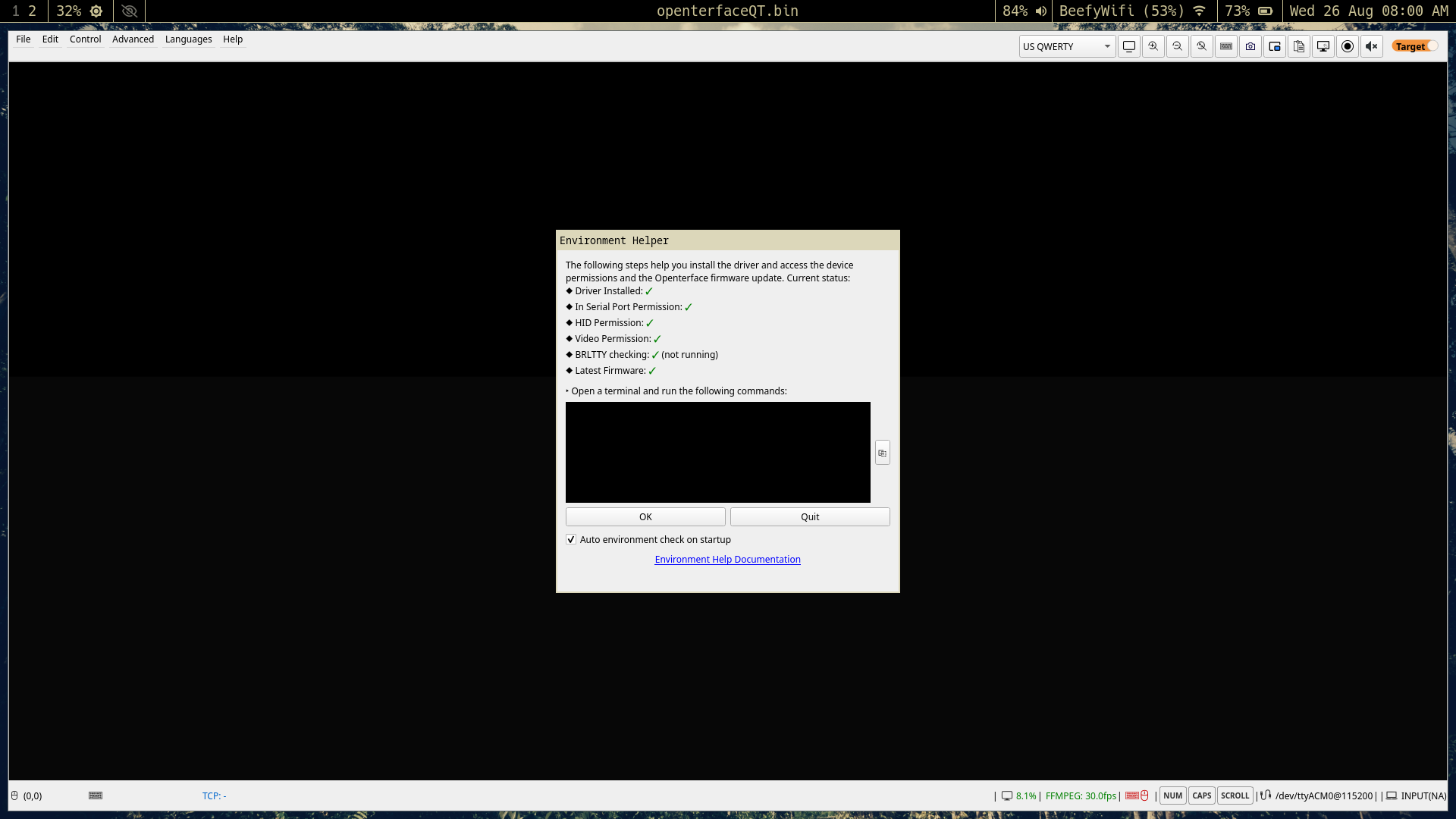
Building on the last post, I installed xorg-xwayland and now the application launches successfully. I can connect and view video, but keys are not yet working. The environment check is still showing several things I need to sort out yet. On to the next step.

[2026-08-23 20:14:13.530][MainThread] [D][default]: Current firmware version:  "00000000"
[2026-08-23 20:14:13.530][MainThread] [D][default]: Latest firmware version:  "26012113"
[2026-08-23 20:14:13.530][MainThread] [D][default]: Firmware is latest:  no
[2026-08-23 20:14:13.530][MainThread] [D][default]: "<br>Current version: 00000000<br>Latest version: 26012113<br>Please update driver to latest version.<br>click OK then Advance->Firmware Update..."
[2026-08-23 20:14:13.530][MainThread] [D][default]: Checking if Openterface devices are on Linux.
[2026-08-23 20:14:13.531][MainThread] [D][default]: libusb initialized successfully.
[2026-08-23 20:14:13.531][MainThread] [D][default]: No Openterface device plugged in
[2026-08-23 20:14:13.531][MainThread] [D][default]: No serial device plugged in
[2026-08-23 20:14:13.531][MainThread] [D][default]: Serial permission check failed.
[2026-08-23 20:14:13.531][MainThread] [D][default]: Checking if BRLTTY is installed.
[2026-08-23 20:14:13.537][MainThread] [D][default]: BRLTTY is not running. Good!
[2026-08-23 20:14:13.537][MainThread] [D][default]: Checking video device permissions...
[2026-08-23 20:14:13.538][MainThread] [D][default]: Checking device: "video0"
[2026-08-23 20:14:13.538][MainThread] [D][default]: Found device with RW access:  "video0"
[2026-08-23 20:14:13.538][MainThread] [D][default]: Video permissions check result:  Yes
[2026-08-23 20:14:13.538][MainThread] [D][default]: Check permission result:  false
[2026-08-23 20:14:13.538][MainThread] [D][default]: Checking if driver is installed on Linux.
[2026-08-23 20:14:13.544][MainThread] [D][default]: Driver installation status: Not Installed

Thanks for reporting this! And sorry about the trouble.

The Arch Linux packaging hasn’t been very well supported in the past. I only got the current package working a few days ago, so honestly, it hasn’t been tested enough yet across different Arch/Wayland setups.

I’d really like to reproduce your setup on my side. Could you share:

  • Arch Linux version (and whether it’s standard Arch or a derivative)

  • KDE Plasma version

  • Whether you’re running KDE on Wayland or X11

The exact Arch + KDE/Wayland versions would be especially helpful. I can then set up the same environment and see if I can reproduce the issue.

Thanks again for reporting it — this is exactly the kind of real-world setup we need to test. :folded_hands:

First, let me apologize with how I started this thread off. I did not mean to come off as a dick, but I fear I probably did. No good excuse, I was just very frustrated and confused. I appreciate you responding and offering to help. I am more than happy to help sort this out and hopefully make it easier for others that may be running in to the same issues.

I’m running standard base install of Arch with Wayland and Sway Window Manger. I did install KDE at one point, just to see if that helped my issues, but I’ve purged that from my system again.

So I think the first thing is, if X11 isn’t detected, one of the dependencies that needs to be installed is xorg-xwayland. I assume that means this app isn’t fully supported on Wayland and requires the xwayland package in order to work. After bumping up to the latest AppImage, as described in my earlier posts, installing xwayland was what finally allowed the application to launch and show the window. My next steps are to get the drivers installed, which I thought I did successfully last night, but it was apparently not successful as the module is not shown loaded with lsmod nor does the environment check show that it is loaded. I will continue trying to work through the drivers and permissions stuff and report back with what I find. Let me know if there is any other info that would be helpful.

Kernel details:

uname -a
Linux barchy 7.1.9-arch1-2 #1 SMP PREEMPT_DYNAMIC Fri, 21 Aug 2026 22:18:59 +0000 x86_64 GNU/Linux

Explicitly installed packages:

pacman -Qe
7zip 26.02-1
android-tools 37.0.0-3
android-udev 20260423-1
base 3-3
base-devel 1-2
brightnessctl 0.5.1-3
cmake 4.4.2-1
efibootmgr 18-4
fd 10.4.2-2
firefox 154.0-1
firmware-manager 0.1.5+15+ga45bdc7-2
firmware-manager-debug 0.1.5+15+ga45bdc7-2
foot 1.27.0-2
fuse2 2.9.9-6
fzf 0.74.3-1
git 2.55.0-1
glu 9.0.3-3
grub 2:2.14-1
imagemagick 7.1.2.30-1
iwd 3.12-1
jq 1.8.2-1
libreoffice-fresh 26.2.5-3
linux 7.1.9.arch1-2
linux-firmware 20260810-2
linux-headers 7.1.9.arch1-2
ly 1.4.1-1
mako 1.11.0-1
networkmanager 1.58.1-1
openssh 10.5p1-1
pulseaudio 17.0+r98+gb096704c0-1
qt6-base 6.11.2-2
qt6-multimedia 6.11.2-1
qt6-serialport 6.11.2-1
resvg 0.48.1-1
ripgrep 15.2.0-1
rsync 3.5.0-1
sudo 1.9.17.p2-6
sway 1:1.12-4
swaybg 1.2.2-1
swayidle 1.9.0-1
swaylock 1.8.6-1
system76-driver 24.04.22-3
system76-firmware 1.0.76-2
system76-firmware-debug 1.0.52-2
terminus-font 4.49.1-8
tldr 3.4.4-1
tmux 3.7_c-1
ttf-hack-nerd 3.5.1-2
vim 9.2.0849-1
vivaldi 8.1.4087.70-1
waybar 0.15.0-2
wget 1.25.0-6
wl-clipboard 1:2.3.0-1
wmenu 0.2.0-1
xorg-xwayland 24.1.13-1
yazi 26.8.15-1
zoxide 0.10.0-1
zsh 5.9.2-1
1 Like

Update:

I am able to manually load the driver with sudo modprobe ch341 (this doesn’t stick on reboot though) and after manually adding some additional udev rules that the install script didn’t add (ones presented in the environmental check dialog), I was able to successfully update the firmware of the mini-kvm.

Now, with all environment checks OK, I can plug in to a target computer and see the console display, but I cannot get the keyboard to work yet.

Please use “lsusb” to display the device output. You may need to install “usbutils” using “sudo pacman -S usbutils”.

It appears that you are experiencing issues with permissions. Please review our wiki at https://github.com/TechxArtisanStudio/Openterface_QT/wiki/OpenterfaceQT-Linux-Environment-Setup for troubleshooting steps. We will be releasing a new version later this week, so please stay tuned for updates.

After adding the additional udev rules, the environmental checks all appear to be ok:

lsusb output shows devices 7, 8, and 9 when I plug in the mini-kvm:

lsusb
Bus 001 Device 001: ID 1d6b:0002 Linux Foundation 2.0 root hub
Bus 002 Device 001: ID 1d6b:0003 Linux Foundation 3.0 root hub
Bus 003 Device 001: ID 1d6b:0002 Linux Foundation 2.0 root hub
Bus 003 Device 002: ID 5986:9102 Bison Electronics Inc. BisonCam,NB Pro
Bus 003 Device 003: ID 8087:0026 Intel Corp. AX201 Bluetooth
Bus 003 Device 007: ID 1a40:0101 Terminus Technology Inc. Hub
Bus 003 Device 008: ID 345f:2109 MACROSILICON
Bus 003 Device 009: ID 1a86:fe0c QinHeng Electronics USB Serial
Bus 004 Device 001: ID 1d6b:0003 Linux Foundation 3.0 root hub
Bus 004 Device 002: ID 18a5:0250 Verbatim, Ltd STORE N GO

And… it turns out the final piece that was causing the keyboard to not work was a bad USB cable. It appears that things are now working OK. I just need to manually load the driver and then I can connect up and all appears to be well. I was checking out some of the hardware diagnostic tests, some of those are failing, despite things seeming to be working just fine.

Happy to help test things out on a vanilla Arch install running Wayland and SwayWM if needed. But after a couple weeks of working through things here, I think I finally have a functional setup for now. Look forward to testing the update out.

Great, you can enjoy it now :clap::clap::clap:

The hardware diagnostic tests are currently only compatible with the older version of KVM. However, your MinikVM is a newer version, it is not suitable yet.

Thank you can do the tester, you can access the newest version at Releases · TechxArtisanStudio/Openterface_QT · GitHub