[From Discord] Failed attempt to change EDID descriptor

Imported from Discord — originally posted by milkperson on 9 March 2025.
Source: Discord


Environment - Windows, using python, hid

It got solved with the firmware update but I elaborate on what I was trying to do in the reddit post there (https://www.reddit.com/r/Openterface_miniKVM/comments/1j22giu/is_there_a_way_to_adjust_the_edid_monitor_name/) but cutting it short - I was doing this (in windows using python) with a made up custom edid to see if I can get it to appear as a “Dell P Series” monitor on the host instead of showing “HD to USB”:

`import hid
import sys
import os
import time

Constants for Openterface Mini-KVM HID device

VID = 0x534D # Vendor ID
PID = 0x2109 # Product ID
EEPROM_WRITE_CMD = 0xE6
EEPROM_READ_CMD = 0xE5
EEPROM_START_ADDR = 0xF0
CHUNK_SIZE = 9 # HID report size limit

# Open HID connection
device = hid.device()
device.open(VID, PID)

print("✍ Writing EDID to EEPROM...")

# Write EDID byte-by-byte with a small delay to prevent corruption
for i in range(128):
    setf_buffer = [0x00, EEPROM_WRITE_CMD, (EEPROM_START_ADDR + i) & 0xFF, 0x00, edid_data[i]]
    device.send_feature_report(setf_buffer)
    time.sleep(0.05)  # Small delay for EEPROM stability

device.close()`

From the Openterface_miniKVM community on Reddit
Explore this post and more from the Openterface_miniKVM community


Staff: please reply here. When resolved, consider linking back on Discord to drive users to the forum.

Originally posted by milkperson on Discord, 9 March 2025.

this was the EDID bin I was writing

`import os

Define the correct 128-byte EDID data

edid_hex = [
0x00, 0xFF, 0xFF, 0xFF, 0xFF, 0xFF, 0xFF, 0x00,
0x10, 0xAC, 0x27, 0xF0, 0x01, 0x01, 0x01, 0x01,
0x80, 0x1A, 0xB5, 0x26, 0x1E, 0x78, 0xEA, 0xA5, 0xA2, 0x58, 0x4A, 0x9A, 0x24, 0x12, 0x50, 0x54,
0xBF, 0xEF, 0x00, 0xA0, 0xA0, 0x40, 0x2E, 0x60, 0x30, 0x20, 0x36, 0x00, 0xDA, 0x28, 0x50, 0x00,
0x10, 0x00, 0x18, 0x00, 0x00, 0x00, 0x00, 0xFC, 0x00, 0x44, 0x45, 0x4C, 0x4C, 0x20, 0x50, 0x31,
0x38, 0x30, 0x30, 0x0A, 0x00, 0x00, 0x00, 0xFD, 0x00, 0x32, 0x4C, 0x1E, 0x53, 0x11, 0x00, 0x0A,
0x20, 0x20, 0x20, 0x20, 0x00, 0x00, 0x00, 0xFF, 0x00, 0x42, 0x43, 0x32, 0x34, 0x35, 0x36, 0x37,
0x38, 0x39, 0x30, 0x0A, 0x00, 0x00, 0x00, 0x00, 0x00, 0x00, 0x00, 0x00, 0x00, 0x00, 0x00, 0x00,
0x00, 0x00, 0x00, 0x00, 0x00, 0x00, 0x00, 0x00, 0x00, 0x00, 0x00, 0x1A # Correct checksum
]

Ensure the EDID is exactly 128 bytes

while len(edid_hex) < 128:
edid_hex.append(0x00) # Pad with zeros if needed

Save to a binary file

edid_filename = “custom_1080p_EDID.bin”
with open(edid_filename, “wb”) as f:
f.write(bytes(edid_hex))

Verify file size

file_size = os.path.getsize(edid_filename)
if file_size == 128:
print(f":white_check_mark: EDID file ‘{edid_filename}’ created successfully and is exactly 128 bytes.“)
else:
print(f”:cross_mark: ERROR: EDID file is {file_size} bytes instead of 128! Something went wrong.")`
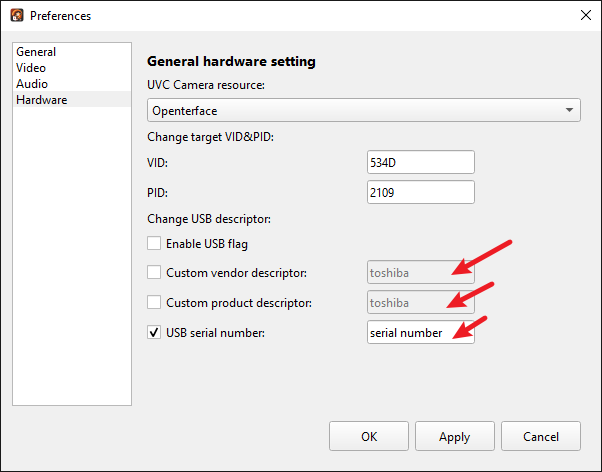
It ended up not putting in the EDID for the video capture card correctly and thankfully I was able to revert back by running the firmware update. Thank you @Kashall !

Originally posted by milkperson on Discord, 9 March 2025.

So the question remains, is it possible to change the MS2109 HDMI-to-USB capture chip’s descriptor/display name/EDID to appear as or spoof a different type of display device like a toshiba, dell, or hp, etc monitor?

I was tyring to go for something similar to pikvm’s kvmd-edidconf set-monitor-name=Toshiba experience. From the reddit post:

Pikvm has a kvmd-edidconf which allows the HDMI EDID to appear to the target as something specific in terms of display name (shown here: EDID - PiKVM Handbook).

kvmd-edidconf --set-monitor-name=PiKVM

By default, Mini-kvm’s display name on the target device shows as “HD TO USB” - is there config or otherwise similar to the --set-monitor-name setting for openterface minikvm to allow that kind of adjustment?

Tuning HDMI EDID - PiKVM Handbook
KVM over IP on Raspberry Pi

Originally posted by milkperson on Discord, 9 March 2025.

I notice that there are these USB descriptors but don’t know what they do

Originally posted by Kashall on Discord, 9 March 2025.

Can you get me what the current EDID is?

Originally posted by Kashall on Discord, 9 March 2025.

Have you looked at GitHub - qoaimei/ms21xx-firmware: Tool to generate ms21xx firmware with custom VID, PID, EDID, descriptors and serial number · GitHub?

GitHub - qoaimei/ms21xx-firmware: Tool to generate ms21xx firmware …
Tool to generate ms21xx firmware with custom VID, PID, EDID, descriptors and serial number - qoaimei/ms21xx-firmware
GitHub - qoaimei/ms21xx-firmware: Tool to generate ms21xx firmware with custom VID, PID, EDID, descriptors and serial number · GitHub?

Originally posted by Kashall on Discord, 9 March 2025.

According to the tools made available to me, the HDMI Replace function is enabled on my Openterface

Originally posted by Kashall on Discord, 9 March 2025.

So there is a way

Originally posted by milkperson on Discord, 9 March 2025.

Nice. I will try an EDID dump. Using my python script I’ve getting

Current EEPROM Data
[121, 121, 121, 121, 121, 121, 121, 121, 121, 121, 224, 148, 10, 64, 14, 84, 255, 255, 255, 255, 255, 255, 255, 255, 255, 255, 255, 255, 255, 255, 255, 255, 255, 255, 255, 255, 255, 255, 255, 255, 255, 255, 255, 255, 255, 255, 255, 255, 255, 255, 255, 255, 255, 255, 255, 255, 255, 255, 255, 255, 255, 255, 255, 255, 255, 255, 255, 255, 255, 255, 255, 255, 255, 255, 255]

but… I don’t know if I’m reading correctly. I’m using this python

`import hid
import sys
import os

VID = 0x534D # Openterface Mini-KVM Vendor ID
PID = 0x2109 # Product ID
EEPROM_READ_CMD = 0xE5
EEPROM_START_ADDR = 0xF0
CHUNK_SIZE = 9 # HID report size limit

def read_edid():
“”“Reads and returns the current EDID from EEPROM (128 bytes).”“”
device = hid.device()
device.open(VID, PID)

current_edid = []
for i in range(0, 128, CHUNK_SIZE):
    setf_buffer = [0x00, EEPROM_READ_CMD, (EEPROM_START_ADDR + i) & 0xFF, 0x00, 0, 0, 0, 0, 0]
    device.send_feature_report(setf_buffer)
    edid_chunk = device.get_feature_report(0x00, CHUNK_SIZE)[4:]  # Ignore first 4 control bytes
    current_edid.extend(edid_chunk)

device.close()
return current_edid

print(“:magnifying_glass_tilted_left: Reading current EDID from EEPROM…”)
current_edid = read_edid()
print(current_edid)`

Originally posted by Kashall on Discord, 9 March 2025.

Can you convert that to Hex?

Originally posted by milkperson on Discord, 9 March 2025.

79 79 79 79 79 79 79 79 79 79 E0 94 0A 40 0E 54 FF FF FF FF FF FF FF FF FF FF FF FF FF FF FF FF FF FF FF FF FF FF FF FF FF FF FF FF FF FF FF FF FF FF FF FF FF FF FF FF FF FF FF FF FF FF FF FF FF FF FF FF FF FF FF FF FF FF FF FF FF FF FF FF FF FF FF FF FF FF FF FF FF FF FF FF FF FF FF FF FF FF FF

Originally posted by milkperson on Discord, 9 March 2025.

Is that what yours outputs or is mine still in some wonky state?

Originally posted by milkperson on Discord, 9 March 2025.

oh wait, I ran it again and now its

[255, 255, 255, 255, 255, 255, 255, 255, 255, 255, 224, 148, 10, 64, 14, 84, 255, 255, 255, 255, 255, 255, 255, 255, 255, 255, 255, 255, 255, 255, 255, 255, 255, 255, 255, 255, 255, 255, 255, 255, 255, 255, 255, 255, 255, 255, 255, 255, 255, 255, 255, 255, 255, 255, 255, 255, 255, 255, 255, 255, 255, 255, 255, 255, 255, 255, 255, 255, 255, 255, 255, 255, 255, 255, 255]

which is this in hex

FF FF FF FF FF FF FF FF FF FF E0 94 0A 40 0E 54 FF FF FF FF FF FF FF FF FF FF FF FF FF FF FF FF FF FF FF FF FF FF FF FF FF FF FF FF FF FF FF FF FF FF FF FF FF FF FF FF FF FF FF FF FF FF FF FF FF FF FF FF FF FF FF FF FF FF FF FF FF FF FF FF FF FF FF FF FF FF FF FF FF FF

Originally posted by milkperson on Discord, 9 March 2025.

Here’s the version of that script that output hex

`import hid
import sys
import os

VID = 0x534D # Openterface Mini-KVM Vendor ID
PID = 0x2109 # Product ID
EEPROM_READ_CMD = 0xE5
EEPROM_START_ADDR = 0xF0
CHUNK_SIZE = 9 # HID report size limit

def read_edid():
“”“Reads and returns the current EDID from EEPROM (128 bytes) as a list of bytes.”“”
device = hid.device()
device.open(VID, PID)

current_edid = []
for i in range(0, 128, CHUNK_SIZE):
    setf_buffer = [0x00, EEPROM_READ_CMD, (EEPROM_START_ADDR + i) & 0xFF, 0x00, 0, 0, 0, 0, 0]
    device.send_feature_report(setf_buffer)
    edid_chunk = device.get_feature_report(0x00, CHUNK_SIZE)[4:]  # Ignore first 4 control bytes
    current_edid.extend(edid_chunk)

device.close()
return current_edid

def bytes_to_hex_str(byte_list):
“”“Converts a list of integers to a hex string with each byte represented as two hex digits.”“”
return " “.join(”{:02X}".format(b) for b in byte_list)

print(“:magnifying_glass_tilted_left: Reading current EDID from EEPROM…”)
current_edid = read_edid()

hex_str = bytes_to_hex_str(current_edid)
print(“Current EDID in hex:”)
print(hex_str)`

Originally posted by Kevin Peng on Discord, 10 March 2025.

The usb vendor description in the screen capture is for keyboard and mouse

Originally posted by sk9la on Discord, 10 March 2025.

Yeah, I tried that, and it just changed the VID and PID of the HID so the target sees it as another device

Originally posted by milkperson on Discord, 10 March 2025.

I see… so we have the ability to change the K & M descriptors via the UI but not the Video Capture card ones. I haven’t gotten the moment to look through the repo Kashall sent but I’m optimistic… I just want to be really careful not to brick my mini-kvm while testing

Originally posted by Kevin Peng on Discord, 10 March 2025.

No worry, no easy to brick it, and I will help you to recover if really bricked

Originally posted by Kevin Peng on Discord, 10 March 2025.

I wrote the wrong eeprom many times, but can still recover it

Originally posted by milkperson on Discord, 10 March 2025.

thank you Kevin. I’m new to this, can you tell me if the code I have above is the correct way to read the edid, that read_edid() - particularly that call to send_feature_report. Or to ask the question differently, how are you reading and writing eeprom? I ask because I’m not sure if I’m doing it right.