Hello everyone,
I just got a batch of Mini-KVM devices from Mouser and I wanted to test them before deploying in the field with Raspberry PIs.
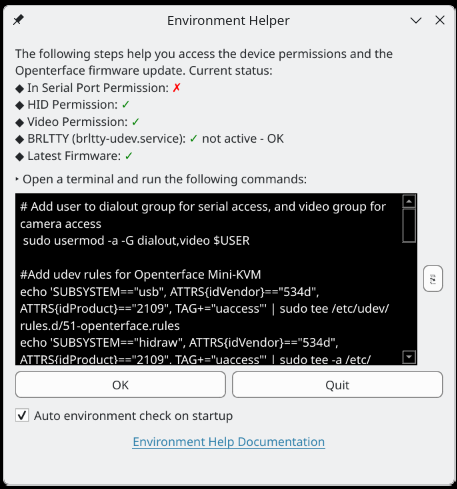
I installed Openterface_QT as appimage on NixOS, followed the rules to give my user access to dialout and video groups as well as configure the udev rules.
The only check I’m missing now is the “In Serial Port Permission”. Apparently there’s a serial chip which I need to see from lsusb but it doesn’t show up at all. Am I missing something? Is the software talking about the hidden extension pins which I’m not using for anything atm or something else is wrong? All 3 of my Mini-KVMs report the same issue. I successfully updated the video firmware on all 3 to latest firmware which right now is 26012113.
[termozour@tz-framework:~]$ lsusb
Bus 001 Device 001: ID 1d6b:0002 Linux Foundation 2.0 root hub
Bus 002 Device 001: ID 1d6b:0003 Linux Foundation 3.0 root hub
Bus 002 Device 002: ID 0bda:0409 Realtek Semiconductor Corp. USB3.2 Hub
Bus 002 Device 003: ID 0bda:8153 Realtek Semiconductor Corp. RTL8153 Gigabit Ethernet Adapter
Bus 002 Device 004: ID 0bda:0409 Realtek Semiconductor Corp. USB3.2 Hub
Bus 003 Device 001: ID 1d6b:0002 Linux Foundation 2.0 root hub
Bus 003 Device 003: ID 32ac:0002 Framework HDMI Expansion Card
Bus 003 Device 005: ID 0bda:5409 Realtek Semiconductor Corp. USB2.1 Hub
Bus 003 Device 006: ID 27c6:609c Shenzhen Goodix Technology Co.,Ltd. Goodix Fingerprint USB Device
Bus 003 Device 007: ID 046d:c548 Logitech, Inc. Logi Bolt Receiver
Bus 003 Device 008: ID 8087:0032 Intel Corp. AX210 Bluetooth
Bus 003 Device 009: ID 0bda:5409 Realtek Semiconductor Corp. USB2.1 Hub
Bus 003 Device 010: ID 0bda:1100 Realtek Semiconductor Corp. HID Device
Bus 003 Device 011: ID 0bda:1101 Realtek Semiconductor Corp. HID Device
Bus 003 Device 018: ID 1a40:0101 Terminus Technology Inc. Hub
Bus 003 Device 019: ID 345f:2109 MACROSILICON
Bus 004 Device 001: ID 1d6b:0003 Linux Foundation 3.0 root hub
